


Search smart coffee brewing system without losing control and Google mostly serves Keurig SMART makers, Wi-Fi drip pots, voice-scheduled carafes, and “best smart coffee maker” roundups. That is a different kitchen.
This Meraki explainer owns control balance for home espresso: how a guided / touchscreen system keeps (or returns) manual control — overrides, when automation helps versus slows you, and weekday trust boundaries. Soft-lane the live touchscreen espresso machine for home hub, programmable espresso / presets, and CoffeeSense NFC. Soft-name A061 (extraction honesty), A062 (recognition Q&A), A064 (first 30 days), A065 (usability), A066 (family profiles), and A069 (auto shot-stop tuning). Soft-lane grams-to-great-shots dosing only as adjacent measurement literacy — not another dosing essay.
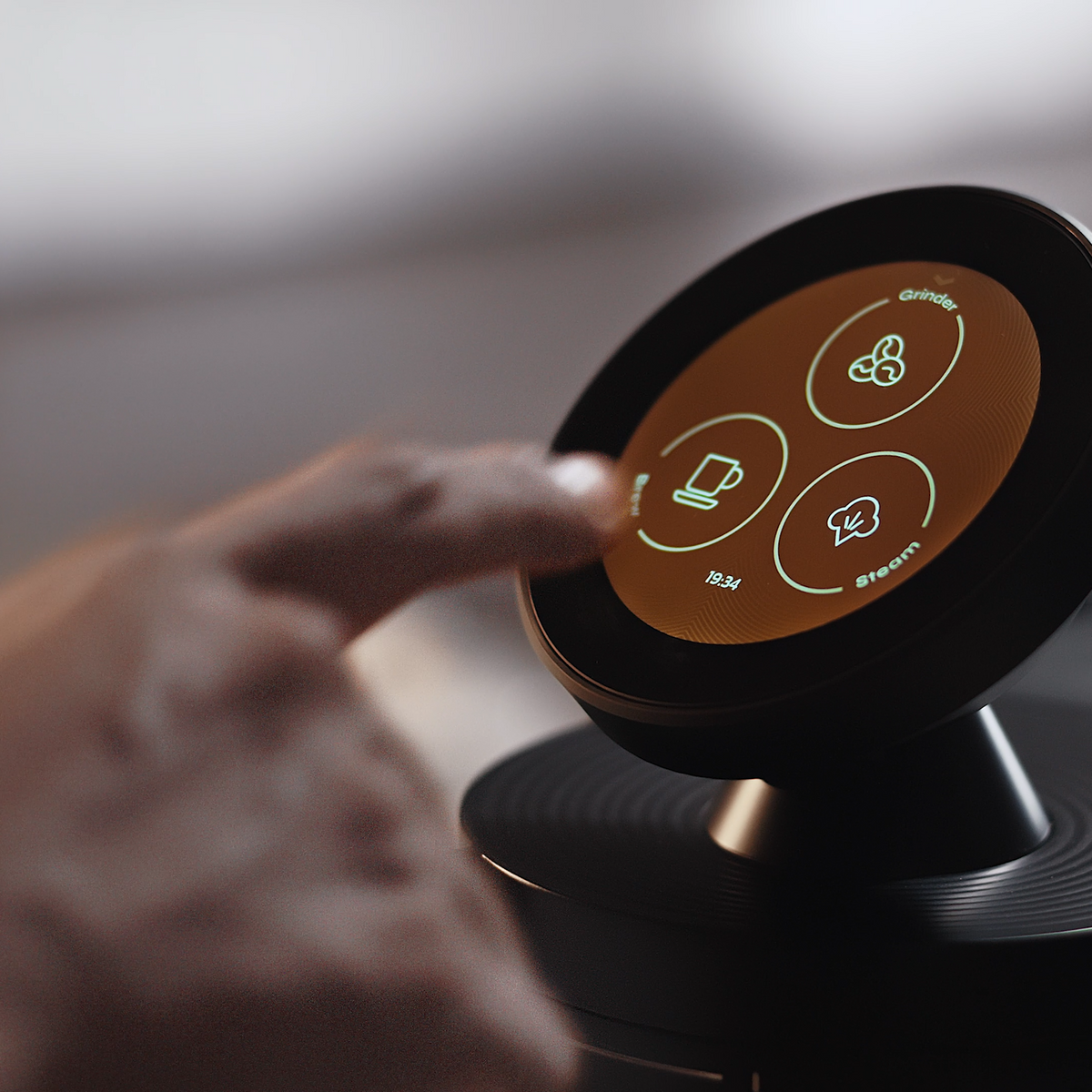
Control balance starts on the screen: suggestions and menus help, but you still choose Grind, Brew, or Steam — and you can change the numbers.
What “smart coffee brewing system without losing control” really means for home buyers
Smart coffee brewing system without losing control, for espresso shoppers, means guidance that shortens weekday decisions without locking you out of grind, dose, yield, or taste overrides — not a Wi-Fi drip that schedules a pot from bed.
SERP for this phrase is drip- and pod-heavy: connected Keurig lines, Alexa carafes, app pour-overs, and carafe-size chips. Useful for remote carafe brew; wrong lane for home espresso smart UX — touchscreen recipes, CoffeeSense™ suggestions on compatible Meraki NFC bags, dual-scale auto-stop at quantities you accept, and editable presets. The Specialty Coffee Association still treats grind, dose, yield, time, and taste as craft you own. “Smart” worth buying makes that craft repeatable on a Tuesday — it does not replace your tongue.
Disambiguate early: this page is home espresso control balance, not a drip “best smart coffee maker” guide.
Who this page is for (and who should skip it)
This page is for control-oriented home espresso buyers — upgraders leaving capsules or opaque super-automatics, gift buyers who fear “smart” means locked menus, and anyone asking whether guided automation will erase dial-in skill.
Skip CoffeeSense extraction honesty (soft-name A061), skeptical recognition Q&A (A062), NFC swipe physics (CoffeeSense NFC how-it-works), and a month-one curriculum (A064). Soft-name A065 (usability), A066 (family profiles), and A069 (auto shot-stop tuning). Soft-lane automatic vs manual for category type. Come here for: can I use smart features without giving up the steering wheel?
Why this is control balance (not another smart drip roundup)
Google’s results answer a different product class. Meraki already publishes touchscreen, presets, CoffeeSense NFC, and smart-hype explainers; soft-name A061 and A062 for honesty and recognition skepticism.
This page owns control balance: what stays manual, when automation helps or slows you, weekday trust boundaries, and how to verify overrides — without inventing remote app shot-firing, AI taste learning, or adaptive mid-shot magic. Disclosure: Meraki publishes this guide and sells the Meraki Espresso Machine. Examples follow verified product and FAQ claims only (2026-10-26/27 snapshot). We will not invent remote app shot control, AI palate learning, adaptive mid-shot extraction, any-bag NFC, or TIMEMORE® authorship of CoffeeSense.
Core idea in plain language
A smart espresso brewing system keeps control when automation proposes and measures, and you still start, edit, and taste.
On Meraki, that balance looks like three cooperating layers (FAQ-aligned, not invented autonomy):
- Guided touchscreen workflow — grind → brew → steam → serve as a sequence you can see and tap (touchscreen hub; also what a touchscreen espresso machine is).
- CoffeeSense™ NFC suggestions — swipe a Meraki coffee bean bag with an NFC chip → machine provides suggested grinding and extraction parameters → you tap the touchscreen to start → two built-in scales can automatically stop grind and extraction once the desired quantity is reached (live FAQ: “How do I use CoffeeSense™?”).
- Presets and programmable control — save what works, reuse it on busy mornings, change it when the bag, weather, or palate shifts (programmable espresso overview; control and presets).
“Without losing control” does not mean zero automation. It means you can refuse a suggestion, change a gram target, ignore a preset, and dial manually when you need to learn. Scales stop at the quantity you accepted — they do not taste. NIST reminds that a stop is only as honest as the zero and target you set. Keep TIMEMORE® mill co-development separate from CoffeeSense NFC guidance.
How it shows up in a weekday workflow
On a weekday, control balance shows up as fewer blank-slate decisions — with an exit ramp when the cup is wrong.
A practical Meraki loop (aligned with live FAQ language; not remote brew-from-the-train fiction):
- Warm up (Meraki FAQ framing often cites about 3–4 minutes for dual-boiler heat — confirm live).
- Either load a saved preset or swipe a compatible Meraki NFC bag so suggested grind and extraction parameters appear.
- Glance the numbers. Trust them on a known bag when mornings are short. Edit one field when the last cup was sour, bitter, or thin.
- Tap to grind; the dose-scale path can stop at the target once set (dual scales explainer).
- Prep the puck — distribution and tamp still matter; smart menus do not level grounds.
- Tap to brew; the yield-scale path can auto-stop at the quantity you accepted.
- Steam if you want milk; dual boilers exist so brew and steam readiness are not a single-boiler tug-of-war.
- Taste. If the cup fails, change one variable — usually grind — rather than opening every smart menu.
When automation helps: known Meraki NFC bag, saved house espresso, a stable guest milk preset, gram auto-stop on busy mornings.
When it slows you: menu-hunting for a one-off drink, re-swiping a bag you already plan to override, or treating “smart” as permission to skip tasting. Soft-name A064 for a first-month curriculum; stay here for control, not onboarding.
What to verify on the machine or listing
Open the live touchscreen page, product page, and FAQ. Treat every “smart / AI / automatic” line as a claim about who still holds the wheel.
- Override path — Can you edit grind, dose, yield, and recipe after a suggestion or preset loads? “Trust the app only” is drip convenience, not espresso control.
- You still start the shot — FAQ: touchscreen tap to start grind and extraction — not a capsule cycle or remote carafe fire.
- Suggestion language — CoffeeSense: suggested grinding and extraction parameters on a Meraki NFC bag. Downgrade “perfect shots without taste.”
- Scales execute, they do not taste — Dual scales can auto-stop at desired quantity (FAQ). Specs snapshots also list 1 kg · ±0.2 g — re-read live. Soft-lane grams-to-great-shots without rewriting dosing here.
- Editable presets — Tools, not cages (programmable control and presets).
- What is not claimed — No inventing remote app shot control, AI taste learning, adaptive mid-shot magic, any-bag NFC, or TIMEMORE® as CoffeeSense. Soft-name A069 for shot-stop tuning later.
- Exit and support — Confirm refund policy and support (+1 833 854 9555, Mon–Fri 9 AM–5 PM EST).
Re-check the FAQ the day you buy; live copy outranks blog memory.
Tradeoffs and limits
Smart espresso UX buys speed and memory. It also creates new ways to feel out of control if you confuse guidance with authority.
- Espresso smart ≠ drip smart. App carafes answer “coffee when I wake.” Guided espresso answers “fewer blank dial-ins without locking the portafilter.”
- Suggestions age. Roast date, storage, humidity, and puck prep can make yesterday’s NFC suggestion wrong today. Override is normal — see SCA research and CoffeeGeek guides.
- Compatible bags only (as published). Meraki NFC bags get CoffeeSense value; unmarked bags dial in manually. That is normal.
- Presets can fossilize a bad shot. Saving sour only makes sour faster. Soft-name A066 for family profiles; here, a preset is a memory, not a medal.
- Wrong targets still auto-stop. Scales obey the grams you accept.
- Menu depth costs time. Soft-name A065 for usability; keep a short weekday trust list instead of exploring every screen before caffeine.
Mistakes that waste time
Most “I lost control to the smart machine” mornings are operator loops, not firmware conspiracies.
- Treating suggestions as grades. CoffeeSense proposes; taste grades. Change grind when the cup is off.
- Editing five variables at once. Change one lever per shot.
- Re-swiping instead of overriding. Edit numbers you already distrust; do not ritualize NFC.
- Shopping drip roundups for espresso answers. Those lists rarely stress portafilter prep, 9-bar framing, or dual-boiler steam.
- Merging TIMEMORE® with CoffeeSense. Mill co-development is not NFC guidance.
- Skipping puck prep because the UI looks smart. Soft-name A061 for extraction honesty after guidance loads.
A simple decision or setup checklist
Use this table when you are deciding whether a guided smart espresso system still leaves you in charge — or when you are setting weekday trust boundaries after unboxing.
| Decision | Prefer more automation | Prefer more manual control |
|---|---|---|
| Morning time | Known Meraki NFC bag or saved house preset | New bag, dial-in day, or teaching a guest |
| Cup feedback | Last shots were stable; reuse numbers | Sour / bitter / thin — change one variable |
| Bag type | Compatible Meraki NFC bag | Unmarked specialty bag (manual dial-in) |
| Household | Soft-name A066 for separate profiles later | One person dialing; keep a single honest preset |
| Feature trust | Dual-scale stop at your targets; touchscreen start | Claims of AI taste, remote shot fire, or any-bag magic — verify or ignore |
| Learning goal | Soft-name A064 for a first-month curriculum | This page’s weekday trust boundaries only |
Setup checklist (short):
- Confirm warm-up behavior on the live FAQ.
- Save one boring house espresso preset after a good tasting day.
- Practice one deliberate override (change grind or yield once) so the menu never feels locked.
- Decide which weekday shots may use CoffeeSense suggestions vs. which bags stay fully manual.
- Re-read support contact hours before you spiral on a stuck screen.
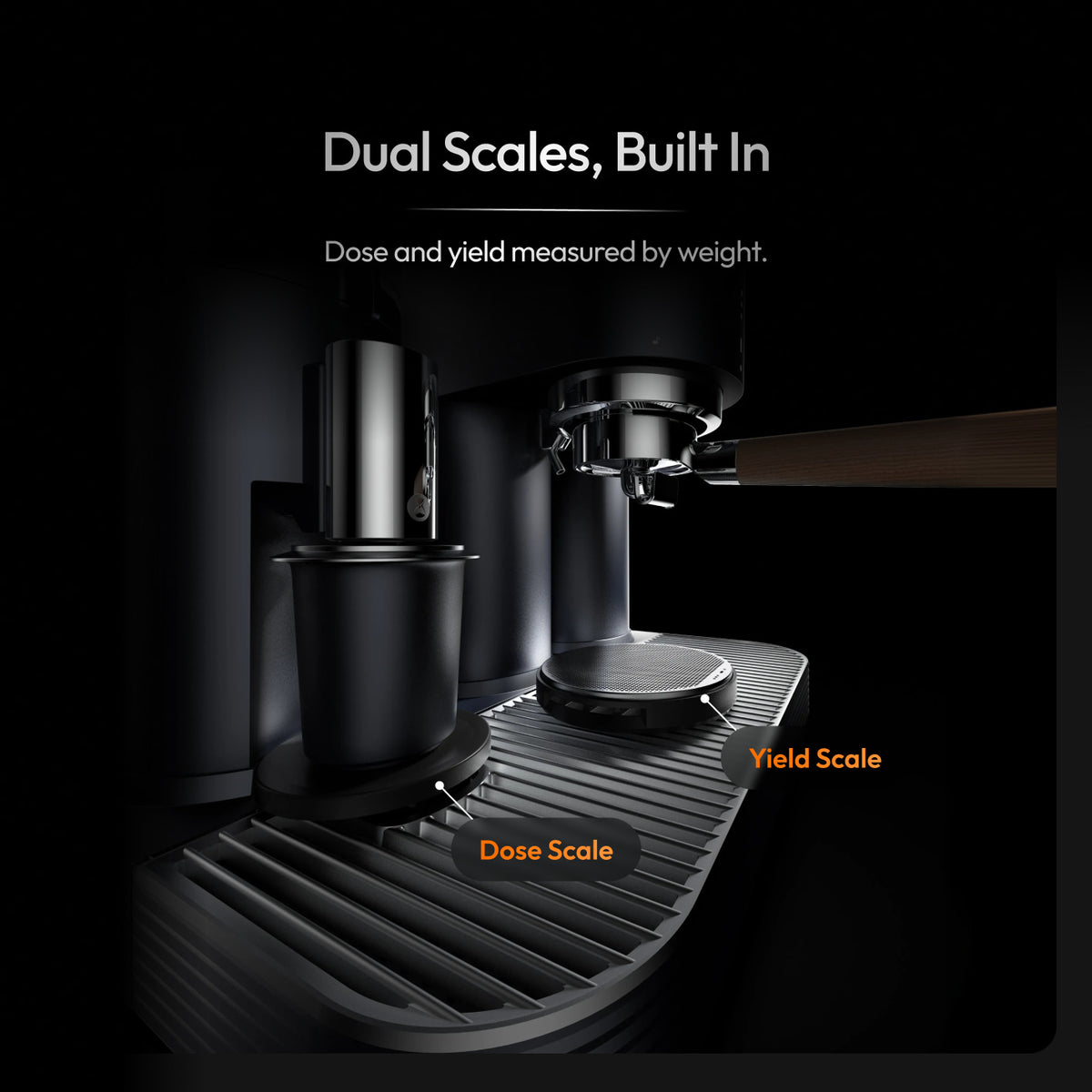
Dual scales enforce the grams you accept — measured stop, not a substitute for tasting or for editing a bad target.
How this connects to Meraki’s dual-boiler system
Control balance is not only software. Hardware concurrency decides whether “smart” mornings still feel manual when milk enters the cup.
Meraki’s dual-boiler framing (live dual-boiler page — re-confirm specs) keeps brew and steam heat paths separate so you are not forced into every automatic shortcut by single-boiler waits. Rotary pump language is commonly framed as a steady 9 bar brew path — not a 15/20 bar scoreboard. Warm-up FAQ language often cites about 3–4 minutes; treat that as a live-check number.
Suggestions and presets do not invent temperature stability; dual boilers do not invent taste. Together they support a guided weekday loop and a second steamed drink without surrendering the calendar. Soft-name A069 for shot-stop tuning; keep this section at system-level control balance.
What is the best smart coffee maker?
No universal best — only the best for your brew method and control needs.
If “smart coffee maker” means Wi-Fi drip or pods, shop carafe size, app reliability, and auto shut-off — that SERP lane is not this page. For a guided home espresso system, judge control balance: override paths, scales that stop at your targets, editable presets, and NFC suggestion language without AI mythology. Meraki’s answer is the guided touchscreen espresso system with CoffeeSense on compatible bags and dual-scale execution — disclosed as Meraki’s product, not a lab ranking. Prefer NCA brewing basics and Barista Magazine literacy over unnamed “Top 5” slideshows that mix drip, pods, and espresso.
What is the Rolls Royce of coffee machines?
“Rolls Royce of coffee machines” is a metaphor, not a ranking this page can award.
People mean prestige hardware — commercial multi-groups, luxury super-automatics, or prosumer dual boilers. None of that answers whether you still control grind, dose, and taste at 7 a.m. Prestige without overrides is a glass case. Prefer dual boilers if you steam daily, measured dose/yield for repeatability, guided menus for fewer blank mornings, and honest claim language over AI theater. Meraki positions a guided all-in-one for that checklist — disclosed as our framing, not a fake award. Skip badge scorekeeping here; judge the weekday wheel.
FAQ
Does a smart espresso system mean I lose manual dial-in forever?
No. On a control-balanced system, smart features propose recipes, remember presets, and can stop at gram targets — you still start the shot, edit parameters, and taste. Meraki’s CoffeeSense path (live FAQ) loads suggested grind and extraction parameters from a Meraki NFC bag; you tap the touchscreen to grind and extract. If a listing offers no override, that is a different product class.
Is Meraki CoffeeSense the same as remote app brewing like smart drip makers?
No. CoffeeSense is on-machine NFC bag recognition → suggested parameters → touchscreen start → dual-scale quantity stop (FAQ). This article does not claim remote app shot control. App-scheduled drip carafes answer a different morning. Soft-name A062 for skeptical bean-recognition shopping questions.
When should I ignore a CoffeeSense suggestion?
When the cup already told you the bag suggestion is wrong for today — humidity, roast age, or puck prep shifted — or when you are deliberately dialing a new unmarked bag. Edit one variable (usually grind) rather than re-swiping for luck. Soft-name A061 for extraction-outcome honesty after guidance loads.
Do dual scales replace tasting?
No. Scales measure dose and yield and can auto-stop at the quantity you accept. They do not detect sour, bitter, or thin. Set honest targets; taste the cup; then save a preset. Soft-lane dual scales for hardware depth; soft-name A069 for auto shot-stop tuning later.
How is TIMEMORE® related to smart brewing control?
TIMEMORE® appears in Meraki materials as grinder co-development — a mill story. CoffeeSense™ is an NFC suggestion workflow. Do not merge them into one “AI grinder brain” claim. Soft-name A045-style TIMEMORE separation when that collaboration essay is the job; keep control balance here.
Conclusion
A smart coffee brewing system without losing control is espresso guidance you can refuse: suggestions and presets for speed, dual-scale stops for measured execution, and a touchscreen path that still lets you change the numbers when taste disagrees — not a Wi-Fi drip roundup, and not A061 / A062 / A064.
If that checklist matches your weekday espresso, start on Meraki’s touchscreen espresso machine for home page and confirm live FAQ wording before you buy. Menus or bag reads: support at +1 833 854 9555, Mon–Fri 9 AM–5 PM EST.


